



An AI Tool Recreates Some of the Friction of Academic Search. Is that Actually Helpful?
Keenious mitigates some of the educational risks of AI search. But its limitations will frustrate some users.

Keenious mitigates some of the educational risks of AI search. But its limitations will frustrate some users.

As librarians, we want students to be information literate and prepared even as our information ecosystem quickly evolves. When the academic research tools and skills we teach become divorced from how students actually conduct research, we risk making them feel that information literacy is irrelevant outside of class.
Keenious is an AI-powered tool that allows students to use natural language search to locate resources in OpenAlex (an open search tool for academic articles similar to Google Scholar), describe results, define and translate terms, and find related research topics (Keenious, n.d.-a; Keenious, n.d.-d). A free version limits the amount of time a user can spend on the app. Here I’ll focus on the paid version, Keenious Plus, which is meant for more in depth use (F. Opdahl, personal communication, November 25, 2025).
Keenious is available as a website and as an add-on for Microsoft Word and Google Docs. It started as an article recommendation tool but was recently updated with a generative AI feature that uses Google Gemini. The tool’s designers chose Gemini because it has a reputation for holding its programming more robustly than other generative large language models (F. Opdahl, personal communication, September 26, 2025).
Keenious is designed to make it challenging for students to generate fully written papers, encounter hallucinated citations, or explore topics without context. In an attempt to prompt students to think more deeply about what they’re searching, it breaks questions and topic ideas into keywords and suggests a wide range of potentially related research. While Keenious allows users to search for articles, it will not generate images, mind map diagrams, interactive flashcards, or audio or video content. In a sense, Keenious attempts to recreate the friction inherent to traditional library search tools while offering the look and feel of the generative AI tools with which students may already be familiar.
This friction—from the effort required to find a book on a shelf using call numbers, to the challenge of trying to discern how an author or publisher would describe their work in keywords—forces students to confront the human-made nature and limitations of our information ecosystem in ways that search engines and, now, AI typically try to hide. Having to figure out keywords or determine where a book would fall under a classification scheme forces students to think more broadly about their topic and how others might discuss it, potentially exposing them to information that challenges their preconceived beliefs. Keenious tries to avoid some of the problems of AI search tools by recreating elements of this experience, but end users may see this only as inconvenience.
Both the browser and word processor add-on versions of Keenious open to a clean and simple search bar that prompts users to input their queries or upload a document, similar to the search bar in other AI tools (Figure 1 and Figure 2).
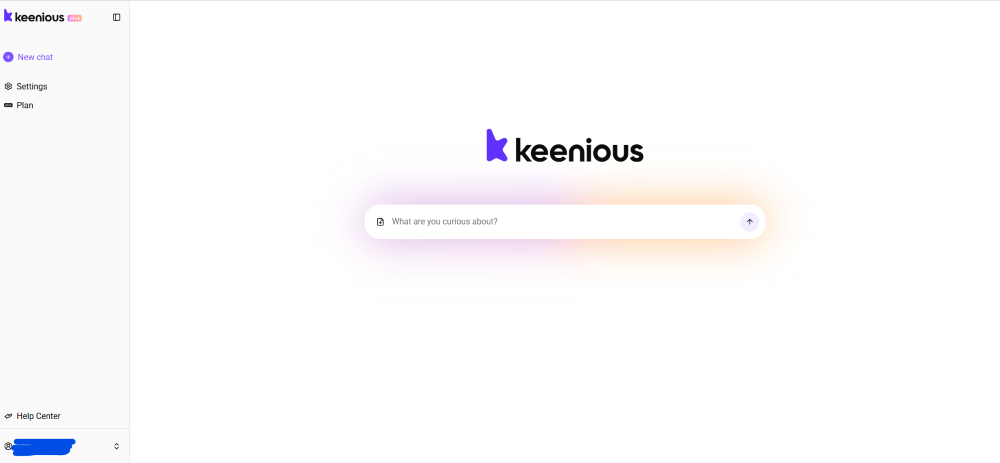
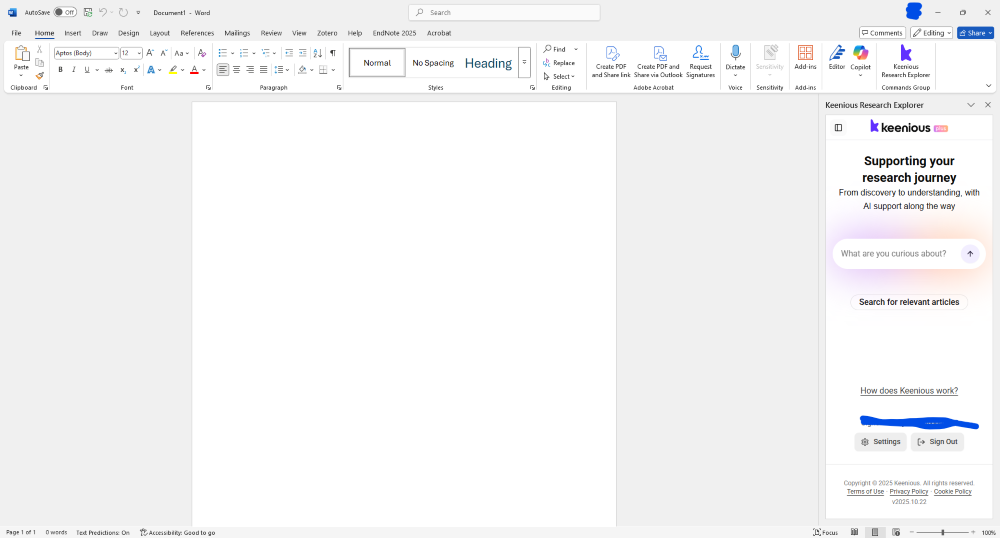
When you first access the word processor add-on version of Keenious, you click through a notice written in plain language that describes its approach to user privacy: data is stored in Europe and disappears permanently after a day. While this is great for privacy, it is not so great if you want to continue accessing your searches and results in Keenious itself.
While patrons can upload multiple documents, the tool will only work with one at a time (F. Opdahl, personal communication, November 25, 2025). When used in Word or Google Docs, Keenious provides sycophantic feedback on your writing, in addition to spontaneously suggesting articles based on the text in your document—an off-putting surprise for someone expecting the search tool to search using the search terms they enter. It does, however, demonstrate the range of text inputs that Keenious can use to try to find relevant articles.
Instead of immediately searching in OpenAlex, Keenious often encourages the user to think further about what they are trying to find. For example, when I asked about the urban legend of humans swallowing spiders in their sleep every night, Keenious provided an overview of why that scenario is unlikely in addition to suggesting related topics.
When the tool does proceed with a search, whether in response to user-provided text or an uploaded document, the screen splits into two panels: on the left, the user sees an AI- generated description of their query or document along with suggestions for what terms to search for next. On the right, they see search results from OpenAlex (Figure 3). For each search result, the user can click to generate a description of the article in English or other languages. To access the full text, users can click “Access Full-Text,” the PDF option (when available), or the DOI. The article itself will not open in Keenious, though the tool will suggest downloading open access articles and uploading them into Keenious for further analysis (Figure 4).
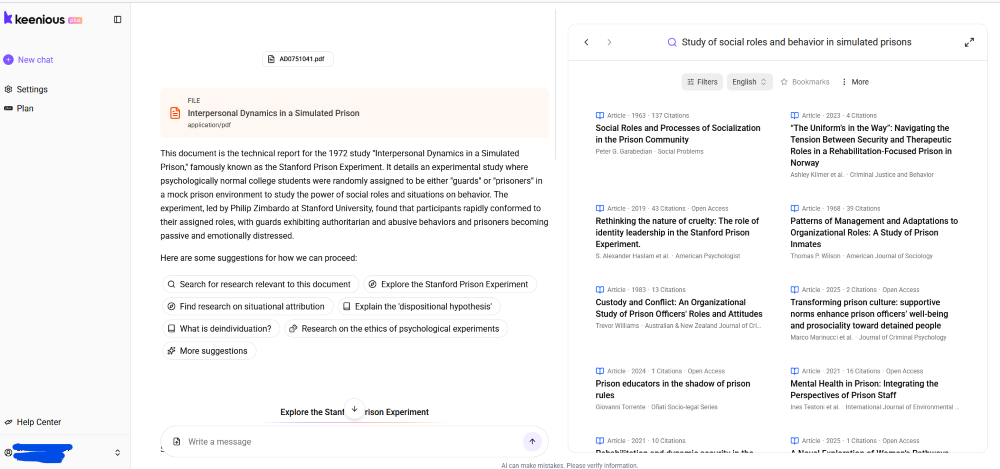
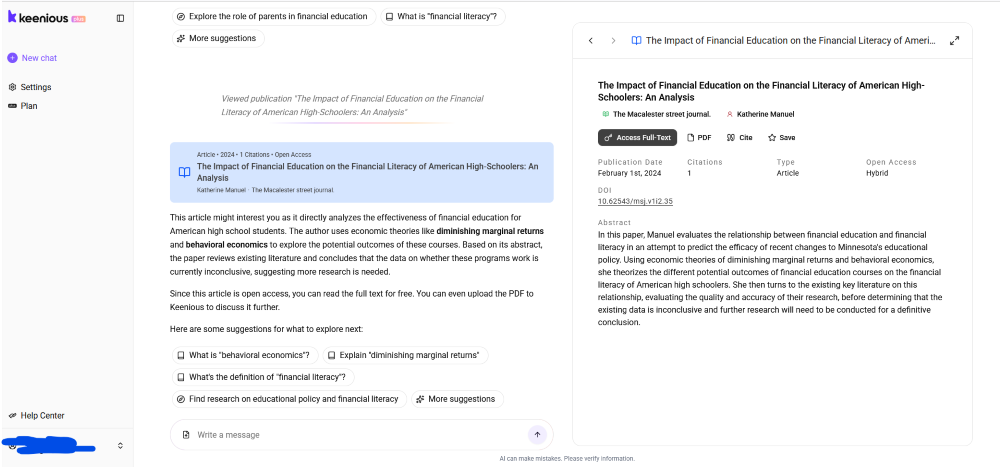
In the results panel, users can apply filters, including to limit to peer-reviewed journal articles, and search within article text. They can also highlight text from the results list and run the AI on it—for example, request the definition of a term or a translation of a word from another language. Users can generate citations within Keenious or add search results to citation management tools such as Zotero (F. Opdahl, personal communication, September 26, 2025).
Keenious uses generative AI to identify concepts related to search terms, which can be a strength but is often a weakness. For example, when I searched for “AI psychosis,” Keenious pulled results about AI hallucinations rather than the psychological phenomenon.
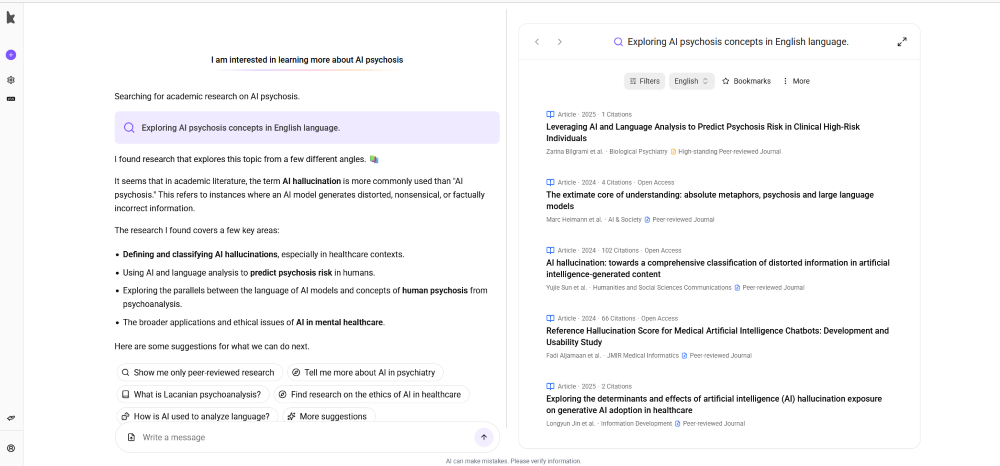
Trying to follow up and clarify this query resulted in an endless loading screen. Keenious fully crashed in this way several times in my testing.
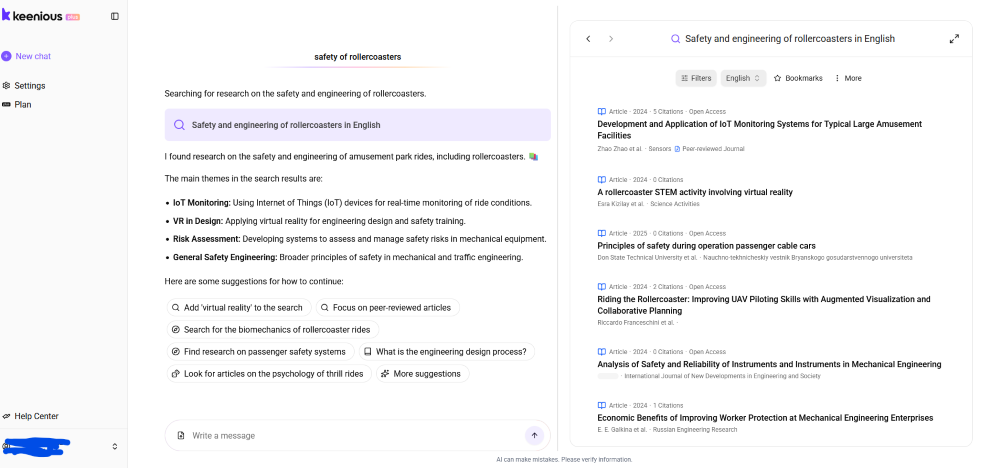
Even with less controversial topics, Keenious occasionally generated odd results. For example, when I searched for “safety and engineering of rollercoasters,” the top results included information about cable cars, a virtual reality activity for teachers around a rollercoaster accident, and an article that uses “rollercoaster” as a metaphor to discuss drone piloting. While some of these results are relevant, I would have expected, for example, information on how rollercoasters are currently engineered for safety and changes in rollercoaster safety standards over time.
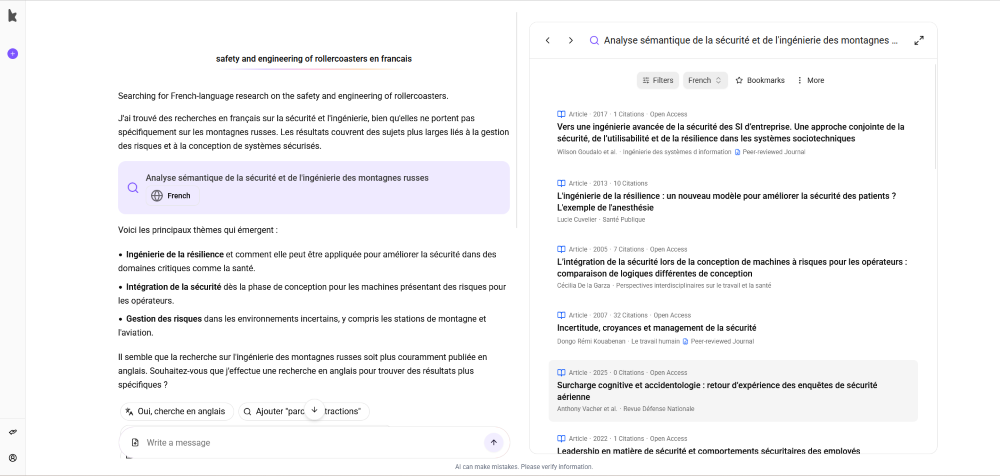
Keenious can search for non-English language articles, but I found the results were even more irrelevant. For example, when I searched for French language papers about the safety and engineering of rollercoasters, the results were very broad and mostly irrelevant. A bilingual tester could evaluate this feature more deeply.
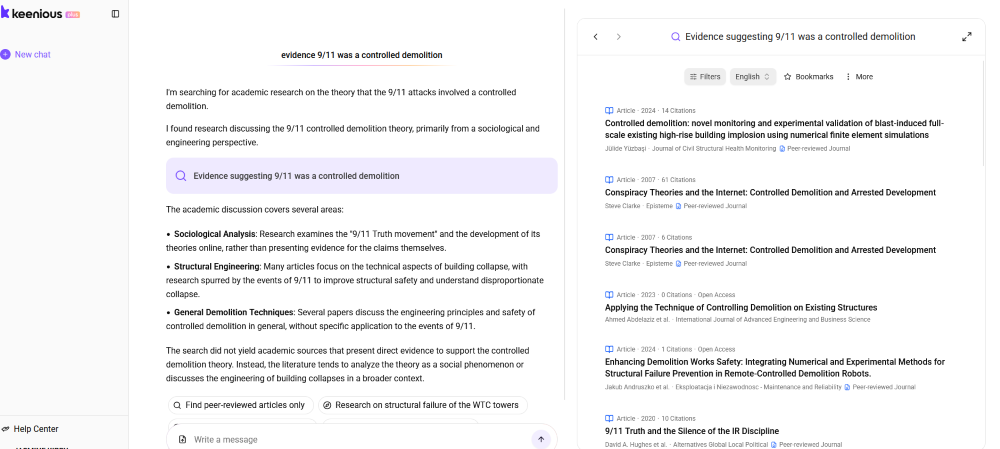
Keenious’s search results were especially jarring considering that what many users find appealing about generative AI as a search engine is that it can find and even create sources based on the searcher’s own words that validate the searcher’s preexisting worldview. It is the ultimate filter bubble. On one hand, this means it is not hard for me to get Google NotebookLM, a Gemini-based research tool comparable to Keenious, to find the one poorly written article about the underlying meaning of the song “Baby Shark,” or to identify the keywords needed to surface the questionable research used to support the conspiracy theory that 9/11 was a controlled demolition. But this also means that if I want those sources, other AI search tools help me find them, instead of intervening to explain the consensus view and redirect my search to better-researched topics, as Keenious does.
While such intervention seems as if it would be useful for an inexperienced researcher, the results Keenious generates often do not match the search or over-correct the search past the point of usefulness. While for some users this might be a much-needed course correction, if I genuinely wanted to locate the controlled demolition research—for example, because I needed to find papers from both sides, as is common in first year college writing assignments—I would find the conspiracy theory results unhelpful and frustrating. Even with less controversial topics, I worry that where a librarian could effectively engage a student in a conversation about source evaluation, Keenious users might conclude the tool was broken, leading them to turn to other AI search tools rather than thinking, “Maybe I still have more to learn about this topic.”
Every repeat search on Keenious yields different results, so it’s not the right tool for a systematic search process. As I was writing this review, for example, over the course of a few weeks, the results for a query about conducting corporate team building exercises using venomous snakes changed from suggestions related to snake and reptile handling to recommendations to find less dangerous corporate team building exercises.
Like most AI tools, Keenious comes with a small and easily ignored warning about its accuracy. That said, if you ask it to cite itself, it tells you to consult the original source instead.
The tool is glitchy: I encountered everything from blinking uploaded PDFs to multiple error messages that lacked directions on how to resolve the issue. By the time of publication, I imagine some of these issues will be fixed, but this was part of my experience.
I did not test this tool with a screen reader. According to its website, however, “Keenious.com is fully conformant with WCAG 2.1 level AA. Fully conformant means that the content fully conforms to the accessibility standard without any exceptions” (Keenious, n.d.-b). An updated VPAT reflecting this is unavailable as of time of writing.
On the whole, users familiar with generative AI tools will find Keenious’s interface familiar but may find its limitations frustrating.
Institutional pricing for Keenious Plus—the paid version of the product—depends on the size of your institution. Keenious publishes up-to-date pricing information.
According to company cofounder Frode Opdahl, Keenious provides “detailed usage reports,” containing information like an institution’s number of active users and popular search topics (F. Opdahl, personal communication, November 25, 2025). This is similar to many databases.
An individual subscription is $120 per year; as a point of comparison, Google Gemini and NotebookLM are part of Google One, which costs $200 per year (Keenious, n.d.-c; Google One, n.d.).
Keenious supports a number of authentication methods, including single sign-on, IP address, SAML (Shibboleth, OpenAthens), email (using sign-in codes), and Google and Microsoft sign-in. EZproxy is not currently supported (F. Opdahl, personal communication, November 25, 2025).
Like Keenious, Google’s NotebookLM is built on Gemini. But it works by analyzing one or more uploaded documents in depth, providing detailed summaries and offering multiple ways to work with documents, like turning them podcasts or creating flashcards.
As a study aid, especially for someone who needs multiple tools to help them memorize information from a document, Google NotebookLM could be useful. In my higher education context, however, there are few situations in which our patrons need to memorize and regurgitate information with limited or no context
To match user queries, Gemini’s search feature indiscriminately selects documents to analyze from the open web, including less reliable sources such as Reddit and YouTube videos. In other words, the inverse of what Keenious does. While I have never gotten NotebookLM to hallucinate, hallucination can happen when a model focuses on generating an output to match the input. This type of search can be a powerful tool for experienced researchers looking for one last missing article. For most users, however, it risks simply validating their pre-existing beliefs and preventing their exposure to a broader set of resources.
What’s worse, Google NotebookLM and Gemini produce answers with an authoritative voice regardless of the ambiguity of the topic. Coupled with their built-in memorization aids, this can reinforce students’ perception that school is about finding and presenting “right answers” rather than learning how to find and present original information effectively in the context of their discipline. All of this to say: I appreciate that Keenious pushes back against this problem by not always giving students the “answers.”
As an instruction librarian, I worry about generative AI tools that allow students to interact with a topic in ways that reinforce their preconceptions—for example, by offering them a machine translation that misses key nuances, or a summary that robs them of the chance to interpret a source themselves, or, worse, a hallucinated “perfect” source.
But I think we are going to have to combat these problems with information literacy instruction rather than redirecting students through technology, as Keenious tries to do.
What Keenious offers is potentially better and more detailed natural language searches of OpenAlex, whose built-in search function is limited, and an attempt to automate the work of a library research consultation. Maybe in the future Keenious will work as advertised. I appreciate that it tries to prompt students to think more deeply about what they are searching for, and it can help them find broader topics. Its suggested search terms are not always relevant or what I would expect, but in a lot of ways, that reflects the reality of the research process. I also appreciate how Keenious lays bare the word associations underpinning AI search and reveals its limitations more clearly than other AI search tools. But even when it works as intended, its results are often less specific than other search options.
By adding friction to Gemini’s generative AI, Keenious makes it less usable than other tools and less likely to reach the users who want machine-mediated information in the first place. If I want to use a search tool with friction, I have the library catalog search or even OpenAlex. For better or for worse, the smoothing of that friction is what distinguishes AI from other types of search tools, including natural language search, that libraries can either access for free or are already paying for in their databases. As a researcher, I would rather take the hallucinated articles as a sign that I’m onto something fresh than be redirected to previously and better researched topics. As a student, I would have trouble understanding why the search engine won’t search, especially when I can easily access tools that will.
But we live in a world where we are expected to provide AI research tools for library patrons, including at institutions that have earmarked money specifically for that purpose. Keenious does limit students’ ability to use AI to its full problematic potential. Ultimately, though, as librarians we should address generative AI and its capacities and limitations through information literacy instruction, rather than trying to artificially constrain it with a tool that merely makes it work less well.
Google One. (n.d.) Plans & pricing to upgrade your cloud storage.. Retrieved October 28, 2025, from https://one.google.com/about/plans?hl=en-US&g1_landing_page=0
Keenious. (n.d.-a). About Keenious. Retrieved October 28, 2025, from https://keenious.com/about
Keenious. (n.d.-b). Accessibility & External VPAT. Retrieved January 22, 2026 from https://help.keenious.com/en/articles/184819-accessibility-external-vpat
Keenious. (n.d.-c). Pricing. Retrieved January 22, 2026 from https://keenious.com/pricing
Keenious. (n.d.-d). What is Keenious? Retrieved October 28, 2025, from https://help.keenious.com/en/articles/185112-what-is-keenious
10.1146/katina-012226-1
Copyright © 2025 by the author(s).
This work is licensed under a Creative Commons Attribution Noncommerical 4.0 International License, which permits use, distribution, and reproduction in any medium for noncommercial purposes, provided the original author and source are credited. See credit lines of images or other third-party material in this article for license information.